

Are you looking for a way to more efficiently monitor team deliverables? If so, you’ll want to check out timeline creator. This easy-to-use tool can help you track project deadlines and tasks while ensuring everyone is on the same page.
As any project manager knows, monitoring team deliverables is one of the most important aspects of keeping a project on track. Missed deadlines can quickly throw a wrench in the gears, so it’s crucial to have a system in place to track progress and ensure everyone is on target. One tool that can be extremely helpful in this regard is a timeline creator.
Here are 15 tips to help you get started in using timeline creator to monitor your deliverables efficiently:
- Define your project scope and objectives. Doing this will help you determine what needs to be included in your timeline. This information is crucial as you need to be organized, and identifying your project scope will define your goals and objectives.
- Gather all of the relevant information from your team members, which includes things like project deadlines, task lists, and any other essential details. These relevant pieces of information from your team members will contribute to putting definite markers on your timeline maker.
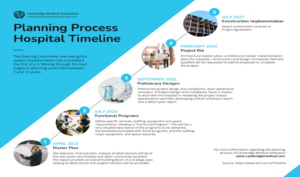
- Input this information into the timeline creator. The software will then generate a timeline that you can use to track progress and ensure everyone is on target. You can also use the free timeline maker to create different kinds of timeline formats to keep you alert and on track with your deliverables.
- Share the timeline with your team members to see what’s expected of them and when things are due. Doing this is also crucial since you need to share your timeline with your team so everyone can be on the same page and give the team every opportunity to work towards your goal.
- Use the timeline creator’s built-in notifications to remind team members of upcoming deadlines or tasks that need to be completed. It is also essential to keep regular reminders for everyone on the team to systematically check everyone’s progress and status on their respective tasks.
- Track deliverables using the software’s reporting features. This way, you can quickly identify any areas falling behind schedule. Tracking and monitoring the performance of every team member is necessary to know whether the individual members are working towards the common goal promptly.
- Make adjustments to the timeline as needed. For example, if a task takes longer than expected, you can adjust the deadline in the timeline creator accordingly. Changes and adjustments are also necessary to counterpoint those unexpected developments within the project.
- Use timeline creator to create project timelines for future reference. This way, you can avoid having to recreate the entire timeline from scratch each time you start a new project. Timeline maker is also helpful for future projects to complement your current one.
- Export your timeline into various formats (PDF, Excel, etc.), so you can share it with others or easily print it out. A free timeline maker is necessary when exporting your timeline to different formats. The accessibility of your timeline and timeline maker is crucial to share with your team and your management.
- Import data from other software applications into timeline creator for even more flexibility. The ability to import and share data with others is necessary to make your team members aware of their tasks wherever they may be.
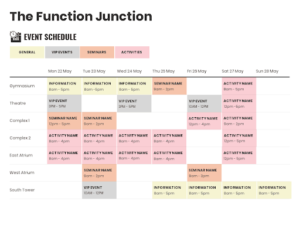
- Give team members access to the timeline creator to update the timeline themselves. It is crucial to have your team members regularly update their tasks and contributions to a shared file so the team leaders can quickly generate reports using the most recent and accurate updates from the team.
- Use the software’s sharing features to collaborate with others on your timeline. For example, you can give team members permission to change or add new tasks.
- Stay up-to-date on your team’s progress by subscribing to the timeline creator’s RSS feed. This way, you’ll be notified whenever a change is made to the timeline.
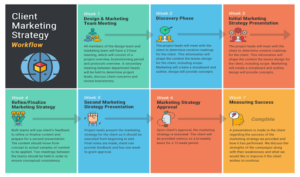
- Use the timeline creator’s activity stream to see a history of all the changes made to the timeline. This feature can be helpful for troubleshooting purposes.
- Get more from the timeline creator by connecting it with other business applications (such as accounting or CRM software). This way, you can manage your business projects from one central location.
There’s no doubt that timeline creator can be a valuable tool for monitoring team deliverables. By following these tips, you can get the most out of the software and ensure that your projects stay on track. Venngage offers an easy way to monitor team deliverables and timelines. Our timeline creator is intuitive and easy to use, making it the perfect tool for busy professionals. Other Venngage products include letterhead and company letterhead formats to help you with your business needs. Sign up for a free trial today and see how our timeline maker can help your team work more efficiently.


