
Skip to content
September 20, 2026
Trending Tags
CESC HRMS CESC HRMS login TCGL HRMS TCGL HRMS login
  • Facebook
  • pinterest
  • youtube
  • G+
  • imgur
  • Twitter
  • disqus
Businessely.com

Businessely.com

  • Business
  • Economy
  • Entrepreneur
  • Finance
  • Industry
  • Market
  • Money & Banking
  • Stock Market
  • Insurance

Breaking News

Indian water proposes to obtain all Indian AirAsia equity

Natural Canine Care – CBD Oil For Dogs

Airtel Prepaid Pack Price Increase by Up to Rs. 501 From November 26: All Details

broadband definition and examples

More modest Private Banks May Benefit From Access To Government Business

Havells India share price declines 9% post Q2 results announcement

Digital Marketing definition

How to Resolve Gmail Sign-in Issues?

Meet Jayanti Chauhan, Bisleri owner’s daughter, who refused to run the Rs 7,000 crore business

Staff definition and examples

Quick Link

  • Home
  • Privacy Policy
  • About Us
  • Contact Us
  • Editorial Policy
  • Terms And Conditions
  • Financial Terms

Follow US

  • Facebook
  • pinterest
  • youtube
  • G+
  • imgur
  • Twitter
  • disqus
 
Read Time:3 Minute, 52 Second
  • Money & Banking

SBI Balance Enquiry Number

On 4 years Ago
Banking
Share

Hello, everyone, I hope you guys are doing well, Are you a customer of State Bank of India? If yes then do you know that you can check your account balance from your mobile phone. Yes, You heard it right, With the Help of SBI balance Enquiry number you can easily you check you account balance within few minutes. 

Now you don’t need to stand in long queues in the bank for hours just to check your account balance, you can easily check your account balance with the help of SBI balance enquiry number. 
SBI Quick- Missed Call Banking 

SBI Quick is a service provided by SBI to all its Customers where you can get your account balance, Mini statement and many more just by giving a miss call to  SBI balance Enquiry number.

Before Using Missed Call Banking You have to Complete One-time registration Process. 

Send SMS, ‘REG<space>Account Number’ to 09223488888

Send this SMS from Your registered Mobile number which is linked with your account. You will receive a confirmation message account the successful registration. 

Now that the registration process is completed, you can use SBI balance Enquiry number Services to know your account details.

  1. Balance Enquiry

To know your Account Balance Give a Missed call or SMS ‘BAL’ to 09223766666. Once You will Give the Missed call your call will automatically get disconnected after 2-3 Rings and after that You will receive an SMS

2. Mini Statement 

To get the Mini statement of your last 5 Transactions Give a Missed call or SMS ‘MSTMT’ to 09223866666

3. Cheque Book Request

Send message “CHQREQ” to 09223588888

Now you will receive an SMS. Send consent SMS (CHQACC<space>Y<space>6 digits no. received in SMS) to 09223588888 within 2 hours of receipt of SMS for further process.

4. E-Statement – last 6 month

You can also avail E-statement of last 6 Month of your saving account. The statement will be sent to your Email with password encrypted PDF file.

Send an SMS ‘ESTMT <space> <Account Number> <space> <code> to 09223588888

5. Block Your ATM card 

In case if you have lost your ATM card or it is been stolen, you can block it directly from your Mobile using mobile Banking. 

To block ATM card send an SMS from registered Mobile Number ‘BLOCK<space>XXXX’ to 567676 (XXXX represents last 4 digits of the card number).

You can also call the SBI customer care to block your Stolen or lost ATM/Debit/Credit card.

The alternative options of SBI balance enquiry numbers are – 

1. State bank of India Net banking-  SBI online banking is a good option to check Your your account Balance.  If you use Internet banking you can easily check your account balance, a Mini statement an many more. Click on this link to visit SBI net Banking Login Page – SBI Online. Follow the steps below To check Your account Balance using SBI online.

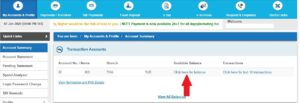
Step 1 – Login to SBI Net Banking using Your username and Password

Step 2 – Go to Quick Access and Account summary Then Check Your Account Balance. See the Screenshot Below for reference.
2. Visiting ATM – You don’t have to stand in a queue to know your account balance in Bank. Just visit the nearest ATM and Insert your card to know Your Account Balance. Click Here to locate Your Nearest SBI Branch & ATM 

3. SMS banking – SMS Banking is one of the best ways to check your account balance. You just Have to SMS Some specific keywords to SMS Banking Number. And You will Get Your Updated account balance on Your registered Mobile Number.

4. Passbook – SBI has provided a passbook printing machine in their bank where you can Print your transactions to know your current balance and another statement. Passbook is not just useful to check your account balance, But passbook last page copy is required while filing IRT, taking a loan and Many More. This is why you should always update your passbook. 

5. SBI YONO – SBI Yono is a Mobile application form which you can get all details about your Account Balance and Mini statement. You can download this application from Google play store and IOS store. Download SBI YONO Here – SBI YONO DOWNLOAD 

In Conclusion 

I hope we have cleared all your queries related to SBI balance enquiry number. If you still have any Queries related to Balance enquiry, You can share with us in the comment section and we will Get back to You As soon as Possible.

Share

Facebook
Twitter
Pinterest
LinkedIn

About Post Author

Banking

Happy
Happy
0 0 %
Sad
Sad
0 0 %
Excited
Excited
0 0 %
Sleepy
Sleepy
0 0 %
Angry
Angry
0 0 %
Surprise
Surprise
0 0 %
In Money & BankingIn sbi balance check number miss call mini statement , sbi balance check number sms , sbi missed call balance check , sbi online balance enquiry app , sbi online balance enquiry by account number

Post navigation

Yes bank Balance check Number Toll Free
How to buy flats ?

Average Rating

5 Star
0%
4 Star
0%
3 Star
0%
2 Star
0%
1 Star
0%
(Add your review)

Leave a Reply Cancel reply

Your email address will not be published. Required fields are marked *

Recent Posts

  • Advanced Portfolio Management in MENA: Techniques and Trends
  • Why Diversification Is Key for Middle Eastern Portfolios?
  • ADSS for UAE and GCC Traders: A Regional Review of Its CFD Trading Offering
  • Global Equities: Advanced Strategies for Trading International Stocks
  • Can Short-Term Loans Boost Your Business Credit Score?

Categories

  • Business
  • Economy
  • Entrepreneur
  • Finance
  • Financial Terms
  • Full Form
  • Industry
  • Insurance
  • Market
  • Money & Banking
  • Net Worth
  • News
  • Stock Market

You May Like

  • Money & Banking
Lorenzo Billie
On 5 years Ago

Most Accurate Way to Install Windows 10 on Your Pc

Read Time:3 Minute, 40 Second
  • Money & Banking
Banking
On 4 years Ago

Maharashtra gramin bank balance check number

Read Time:6 Minute, 40 Second
  • Money & Banking
Roblox John Williams
On 2 years Ago

Investiit.com Stocks: Complete Guide to Invest in 2025

  • Business
  • Market
  • Money & Banking
Roblox John Williams
On 5 years Ago

Stocks in U.S. and Europe flat, following gains in Asia

  • Money & Banking
Lorenzo Billie
On 5 years Ago

Indian Bank Balance Enquiry Number 2021 by Missed Call, SMS

Read Time:2 Minute, 45 Second
  • Money & Banking
Banking
On 4 years Ago

Punjab and Sind bank login

About Businessely

Businessely.com is a website that is used to give the latest information and news to people from all over the world as soon as possible. Ergo, the main aim of ours is to keep the generation updated regularly about attention span lower than that of fish. The different sections on our page are business, finance, market, and the latest section on our website is of stocks.

Therefore, this business news contains all the finance drama, markets research, industry and other major incidents that are taking place all around the world or when you are busy dealing with things around day today.

Quick Contact Info

Phone : +1 (954) 302 5379 / +1 (954) 302 5397

Email : editor@businessely.com /roblox@businessely.com

Editor In Chief : Roblox John Williams

Follow Us

Quick Link

  • Home
  • Privacy Policy
  • About Us
  • Contact Us
  • Editorial Policy
  • Terms And Conditions
  • Financial Terms
  • Home
  • Privacy Policy
  • About Us
  • Contact Us
  • Editorial Policy
  • Terms And Conditions
  • Financial Terms